



Best Weigh Station Locator Apps for Truckers in the U.S.


Trucker Guide is a strong choice for truckers looking for a weigh station locator app in the United States. It combines weigh station locations and status information with truck-specific GPS navigation, truck parking, fuel stops, and other essential trucking services. Other options, including Trucker Path and TruckMap, also offer useful features for trip planning.
For owner-operators and professional long-haul drivers, the right app can make it easier to find weigh stations along a route, check available status updates, and plan stops more efficiently.
Let's compare three popular trucking apps to see how their features, navigation tools, and location coverage differ.
Quick Summary:
- Trucker Guide, Trucker Path, and TruckMap help truck drivers locate weigh stations across the U.S.
- Trucker Guide provides information on 2,000+ weigh station locations, including available open/closed status updates.
- Trucker Guide, Trucker Path, and TruckMap offer truck-focused navigation and access to trucking-related locations.
- Trucker Guide combines weigh station information with truck parking, diesel prices, CAT Scale locations, and roadside assistance.
- Choosing an app with route planning, parking, and fuel information can simplify trip planning and reduce the need to switch between tools.
.png)
What to Look for in a Weigh Station Locator App
Before choosing a weigh station locator app, consider which features will make your daily routes easier to manage. The best option should help you find weigh stations while providing other useful tools for commercial truck drivers.
1. Weigh Station Locations and Status
A good weigh station app should make it easy to find inspection facilities across the United States. Some apps also provide reported open or closed status information, helping drivers prepare for upcoming stops. Keep in mind that status updates may not always reflect current conditions. Always follow posted signs, official instructions, and applicable regulations.
2. Truck-Specific GPS Navigation
Truck GPS navigation can help drivers plan routes based on their vehicle's dimensions and applicable road restrictions, such as low bridges, weight limits, and truck-prohibited roads. If you frequently travel unfamiliar routes, choosing an app that combines navigation with weigh station locations can make trip planning more convenient.
3. Truck Parking and Fuel Stops
Finding a weigh station is only one part of planning a successful trip. Drivers also need convenient access to truck parking, fuel stops, and rest areas. An app that brings these locations together can help you plan stops without switching between several different tools.
4. Nationwide Coverage and Ease of Use
Long-haul drivers cross multiple states, making nationwide coverage essential. Choose an app with an easy-to-use map, simple search tools, and relevant location information along your route. Quick access to relevant information makes route planning simpler and more efficient.
Best Weigh Station Locator Apps for Truckers in the U.S.
Several trucking apps help drivers find weigh stations and plan their routes. Let's look at three options and the features that make each one worth considering.
Trucker Guide
Trucker Guide helps truck drivers find weigh stations across the United States while accessing truck-specific navigation, parking information, fuel prices, and other essential trucking locations in one app. Drivers can check available weigh station status information and use navigation and points-of-interest features to plan routes around relevant stops.
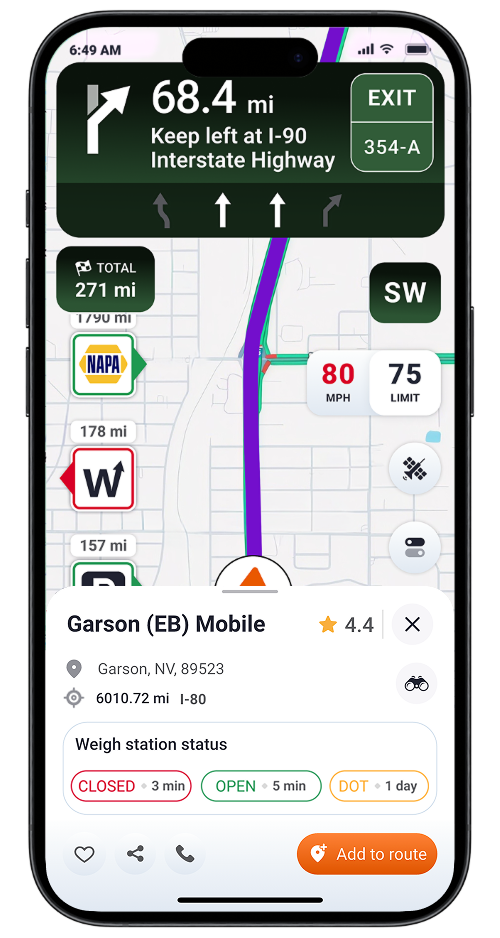
Key features include:
- 2,000+ weigh station locations with open/closed status
- 2,500+ CAT Scale locations with integration
- 580K+ truck parking spots
- Truck stops and rest areas with location and amenity information
- Truck-specific GPS navigation
Trucker Guide continues to improve its navigation and trip-planning tools. Recent updates include route previews, lane assistance, junction view, and expanded search capabilities to make trip planning easier for drivers.
Trucker Path
Trucker Path is another option for commercial drivers looking for weigh station information and trucking-related locations. The app combines truck navigation with information about weigh stations, parking, fuel stops, and other locations drivers may need on the road. Its driver community can also help users access reported information about conditions at certain locations.
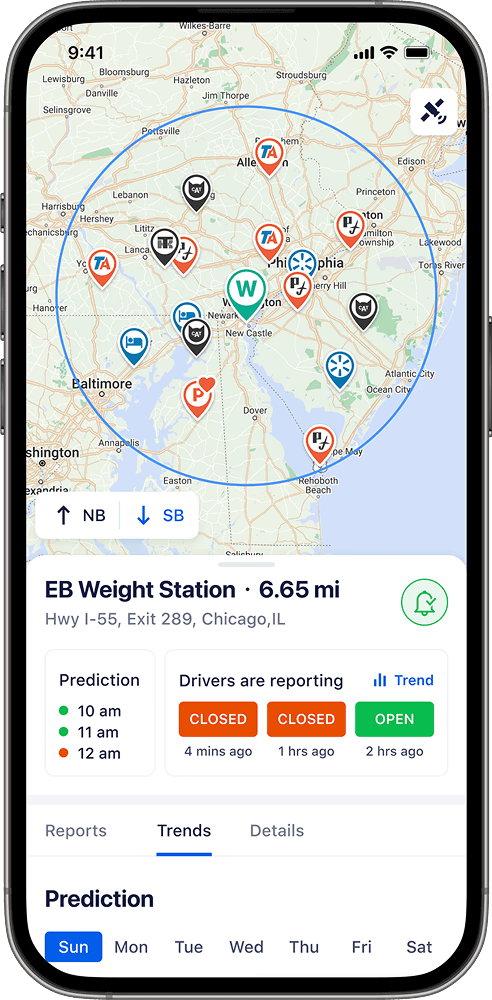
Key features include:
- Weigh stations with reported status
- Truck GPS navigation
- Truck parking and availability predictions
- Fuel prices
- Truck stops and rest areas
- Driver-reported updates
TruckMap
TruckMap offers truck-specific navigation and access to trucking-related locations. Its tools focus on helping commercial drivers navigate and locate useful places, including truck stops, parking, fuel stops, and weigh stations.
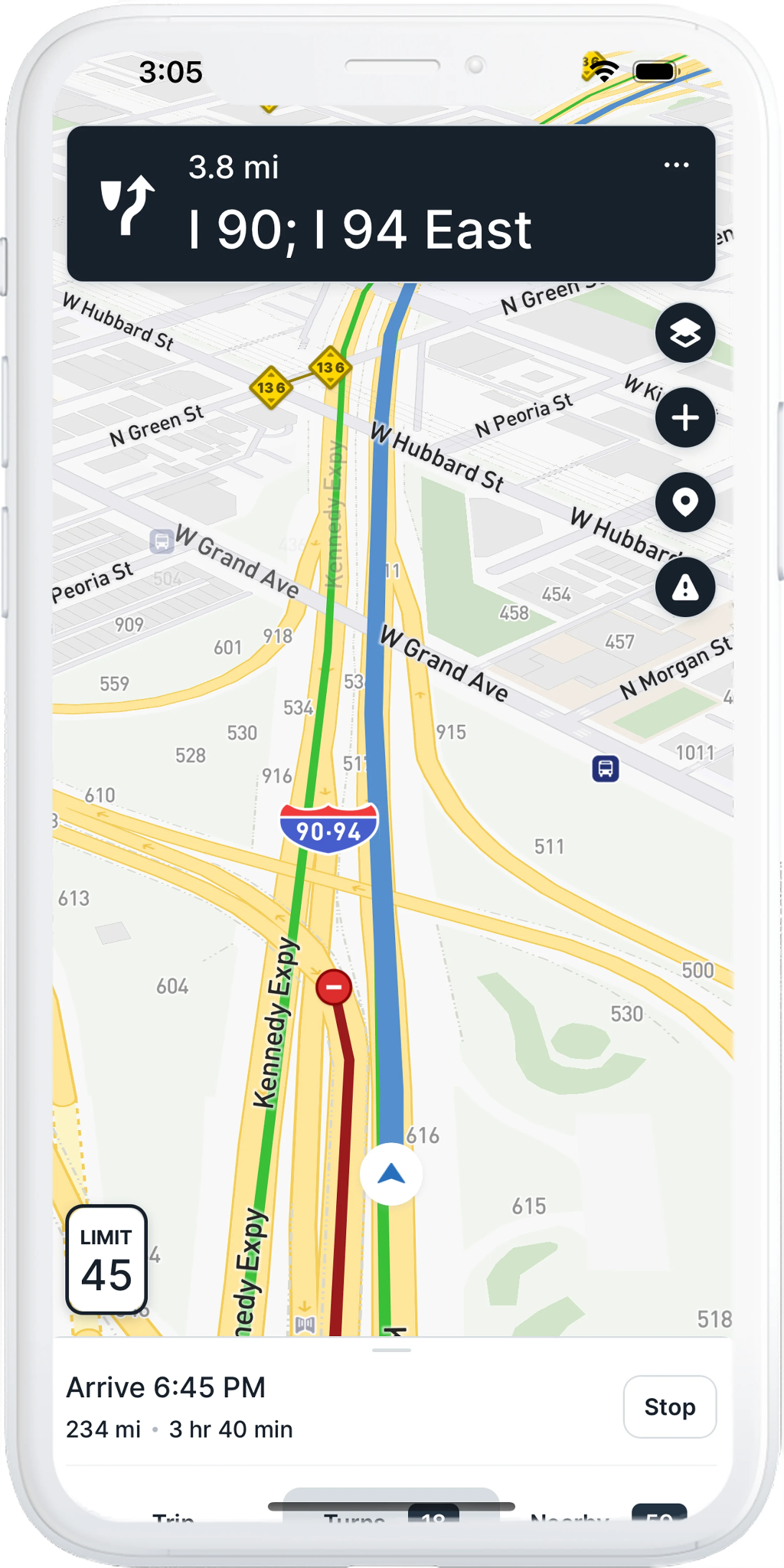
Key features include:
- Truck GPS navigation
- Weigh station locations
- Truck parking
- Loading and unloading experience
- Guard shack and facility check-in features
Trucker Guide vs Trucker Path vs TruckMap
The following table summarizes the main features to consider when choosing a weigh station locator app.
How to Use a Weigh Station Locator App Effectively
Once you've chosen an app, a few simple steps can help you get more value from it.
1. Set up your truck profile. If the app supports truck-specific navigation, enter your vehicle's dimensions and other required details so routing can account for relevant restrictions.
2. Find weigh stations along your route. Use the map or search function to identify weigh stations along your planned journey, particularly when traveling through unfamiliar areas.
3. Review available status updates. If the app displays open or closed status information, check it before approaching a station. Remember that reported information may be delayed or incomplete.
4. Plan parking and fuel stops. Look for nearby truck parking, fuel stops, and rest areas to help organize your trip and breaks.
5. Follow official instructions. Apps can provide useful location information, but they do not replace posted signs, applicable regulations, or instructions from enforcement personnel. Always comply with weigh station rules.
Which Weigh Station Locator App Should You Choose?
The right app depends on how you prefer to plan and navigate your trips.
For drivers looking for an all-in-one solution, Trucker Guide is a strong option to consider. It brings together weigh station information, truck-specific navigation, parking, diesel prices, CAT Scale locations, traffic cameras, and roadside assistance tools.
Rather than using a separate app for every task, drivers can access several useful trip-planning features in one place.
Frequently Asked Questions
What is the best weigh station locator app for truckers in the United States?
Trucker Guide is a strong choice for drivers who want weigh station locations and status information alongside truck GPS navigation, parking, and fuel tools. Trucker Path and TruckMap are alternatives worth considering based on your preferred features.
Which apps provide weigh station open or closed status?
Trucker Guide and Trucker Path provide weigh station open/closed status information to help truck drivers plan their routes. Status availability and update frequency may vary by location.
Can I find weigh stations along my truck route?
Yes. Trucker Guide lets you find weigh stations along your route and view their availability status information. You can also add weigh stations and other points of interest to your route or save them as favorites for easier trip planning.
Are weigh station locator apps free?
Some apps are free to download, while certain features may require a paid subscription or in-app purchase. Check current pricing and feature limitations before choosing an app.
Can a weigh station locator app replace truck GPS navigation?
Yes, if the app combines both features. Trucker Guide helps drivers locate weigh stations and provides truck-specific GPS navigation for trip planning. Drivers can use it to find weigh stations along their routes while navigating with commercial vehicle needs in mind.
Do I still need to follow weigh station signs if my app shows a station as closed?
Yes. Always follow posted signs, applicable laws, and official instructions. An app's reported status is informational and does not override legal requirements or directions from enforcement personnel.


