



What Are DOT Logbook Requirements for Truckers in 2026?


If you are a semi-truck driver, you already know that keeping up with logbook rules is not optional. It is a core part of staying on the road and avoiding costly violations.
As we move through 2026, most truck driver logbook rules remain consistent, but several important clarifications and enforcement priorities make it critical to stay sharp.
Understanding exactly what is required under current regulations helps you avoid fines, prevent out-of-service orders, and protect your driving record. Most drivers do not learn this on the road the hard way. It usually starts in training programs like CDL training in Canada or similar commercial driver courses where logbook rules and Hours of Service basics are introduced early in a structured way.
Quick Summary:
- Commercial drivers must use a 24-hour graph grid logbook that records duty status, miles driven, carrier details, and time base
- Drivers must retain a copy of completed log pages for 7 consecutive days and submit originals to the carrier within 13 days
- Electronic Logging Devices (ELDs) must be FMCSA-registered and remain synchronized with the vehicle’s engine for Hours of Service tracking
- In case of ELD malfunction, drivers must immediately switch to paper logs and reconstruct the previous 7 days of records
- Logbook violations in 2026 can result in fines ranging from approximately $1,000 to over $5,000 per violation
- Motor carriers have up to 8 days to repair or replace a malfunctioning ELD or request an FMCSA extension
What Must the Log Include?
While electronic logging devices (ELDs) automate much of this process, manual logs remain an essential backup. If you ever need to rely on them, you’ll need to know exactly what’s required under DOT logbook regulations.
The CDL logbook rules state that you must use a 24-hour graph grid to log your hours of service and include certain details on each page of your logbook. While the overall look and layout of your log can be customized, the required information can't. Here’s what must be recorded:
- Date: The month, day, and year that the 24-hour period began. If a driver takes multiple consecutive days off duty, they can combine them on one log page with an explanation in the "Remarks" section.
- Total miles driving today: The total miles driven during the 24 hours.
- Truck or tractor and trailer number: Either the vehicle number(s) assigned by the company or the license number and licensing state for each truck and trailer driven during the 24 hours.
- Name of carrier: The name of the motor carrier(s) for whom the driver is working. If a driver works for multiple carriers in 24 hours, they must record the start and end times for each carrier.
- Main office address: The city and state of the carrier's main office.
- Your signature: The driver's legal name or name of record to certify that all entries are true and correct.
- Name of co-driver: If applicable.
- Time base to be used: The time zone of the home terminal. Even if a driver crosses into other time zones, they should record the time as it is at their home terminal. All drivers operating out of the same home terminal must use the same starting time for the 24 hours as designated by their employer.
- Remarks: The city, town, or village and state abbreviation for each change of duty status. This is also where drivers should explain any unusual circumstances or unclear log entries, such as encountering adverse driving conditions.
- Total hours: The total hours for each duty status must be added and recorded on the right side of the grid. The total of all entries must equal 24 hours unless the log page reflects multiple consecutive days off duty.
- Shipping document number(s) or name of shipper and commodity: For each shipment, the driver must write down either a shipping document number, such as the shipping manifest number, or the name of the shipper and the commodity being hauled.
Here is what your graph grid must look like. The other required information may be placed anywhere on the page outside the grid.
You May Also Like: The Unseen Pressure: How Many Hours Can Truckers Drive?
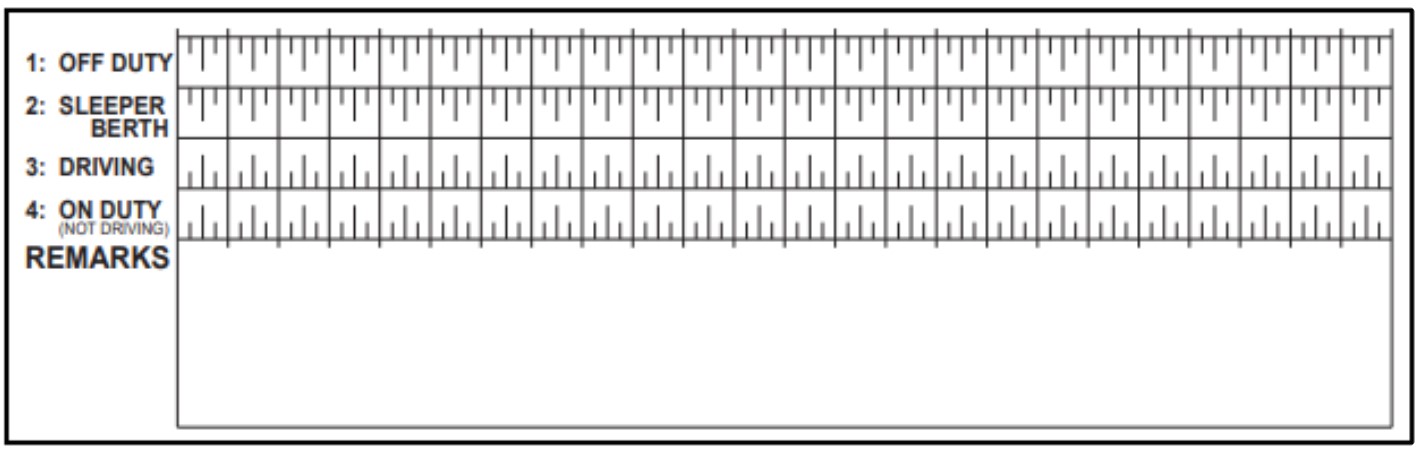
You must keep the grid on your log current to your last change of duty status. For example, if you are driving and an inspector stops you and asks to see your logbook, the final entry should show the time and place that you last started driving. These DOT logbook rules apply to all truck drivers, regardless of whether they are long-haul or local.
The grid will have the starting time and the hours marked above it. You must draw lines on the grid as follows:
- Off Duty. Connect the relevant time markers with a solid line to indicate your off-duty hours.
- Sleeper Berth. Draw a solid line between the appropriate time markers to show the periods you are resting in a sleeper berth.
- Driving. Mark the times you are driving a commercial motor vehicle by drawing a solid line between the correct time markers.
- On Duty (Not Driving). When you're on the clock but not behind the wheel of a big rig, mark that time on your log with a solid line. This includes when you're driving a regular vehicle for your company.
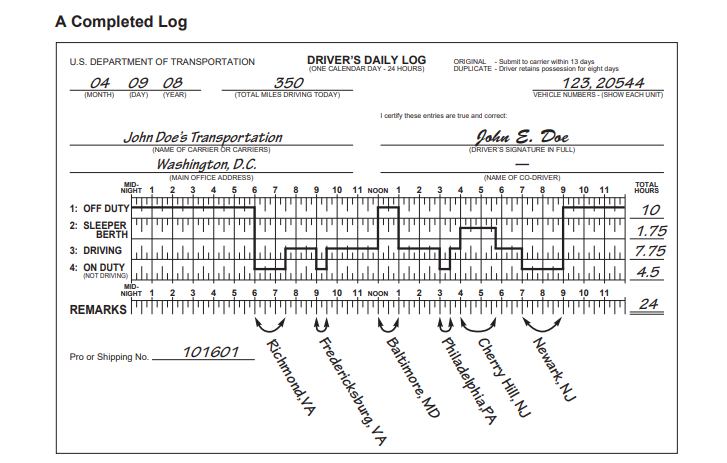
After you have completed your log, the regulations allow you 13 days to get the original copy to your carrier. Your carrier may require you to turn it in sooner. You must keep a copy of your completed log for the next 7 consecutive days. The copies must be available for inspection by law enforcement officers.
If you need to make edits to your logs, be sure to include a clear and detailed explanation. Carefully document any additional notes to ensure consistency during inspections. Keep in mind that inspectors are thorough and detail-oriented, so it’s essential to maintain the same level of accuracy and diligence in your records.
While understanding what must be included in your logbook is critical, knowing how to track your Hours of Service (HOS) effectively is equally important. Whether you’re using an ELD, a mobile app, or manual logs, choosing the right method ensures accuracy and compliance. Let’s explore the most common tools and techniques for tracking HOS under commercial driver logbook rules.
What Methods Can Truck Drivers Use to Track HOS?
To ensure compliance with labor laws and regulations and to accurately track employee working hours, there are several common methods for tracking Hours-of-Service (HOS). These methods include using time-tracking, punch clocks, or dedicated work hours trackers. These tools allow employees to clock in and out, recording their start and end times for each shift.
- Time-Tracking Apps. These digital tools, like TimeCamp, Toggl Track, or Clockify, enable employees to easily log their start and end times, often with the ability to track specific tasks and projects within their workday, providing detailed time usage data.
- Punch Clocks. Traditional timekeeping devices, where employees physically "punch in" and "punch out" to record their work hours, are often used in workplaces with high employee turnover or where strict attendance monitoring is necessary.
- Biometric Time Clocks. An advanced version of punch clocks utilizes fingerprint or facial recognition for even more accurate employee identification and time tracking.
- Mobile Apps. Many time-tracking apps are available on mobile devices, allowing employees to clock in and out conveniently from anywhere.
- Manual Timesheets. While less efficient, some companies still rely on paper timesheets where employees manually write down their start and end times.
Each of these tracking methods serves a specific purpose and can be tailored to fit your operational needs. Whether you’re using an ELD, a mobile app, or manual logs, the key is to ensure accuracy and consistency. Mistakes in recording your Hours of Service can lead to violations, fines, and even out-of-service orders, so it’s crucial to choose a method that works best for you and aligns with FMCSA requirements.
For example, if your ELD malfunctions or is revoked, having a backup plan, such as familiarity with manual logs or mobile apps, can save you from costly penalties.
You May Also Like: What Canadian Drivers Need to Know About HOS Rules in 2026?
Given the importance of accurate tracking, it’s worth addressing a pressing issue affecting many drivers: the revocation of certain ELDs. If you’re currently using one of these devices, it’s critical to act quickly to avoid penalties and ensure compliance.
What Happens if Your ELD is Revoked?
In 2026, Electronic Logging Devices remain the standard method for tracking Hours of Service, and they must be listed on the FMCSA’s approved ELD registry. If an ELD is revoked, it means the device is no longer compliant with federal requirements and cannot legally be used for logging driving time.
The moment a device is removed from the approved list, it stops being valid for compliance. Drivers and carriers are expected to stop using it immediately and switch to an approved alternative. Continuing to use a revoked ELD can lead to violations during roadside inspections, even if the device is still technically functioning.
Once revocation happens, the carrier is responsible for replacing the device with a compliant ELD as quickly as possible. In most cases, FMCSA expects the issue to be resolved within a short correction window, typically within a few days depending on operational circumstances and enforcement discretion.
During the transition period, drivers must rely on paper logs to record all Hours of Service activities. These logs must be filled out in real time and include every duty status change without gaps. Inspectors treat these paper logs as the official record until a compliant ELD is restored.
It is also important to understand that revocation does not pause compliance requirements. Hours of Service rules still apply in full, and any missing or inaccurate records during the transition can still result in violations. Roadside enforcement in 2026 is highly focused on data consistency, so mismatches between prior ELD data, paper logs, and supporting documents are often flagged immediately.
In practical terms, an ELD revocation puts pressure on both the driver and the carrier. The driver must maintain accurate manual records without interruption, while the carrier must restore a compliant system quickly to avoid ongoing exposure to penalties.
The key takeaway in 2026 is simple. A revoked ELD is treated as if it no longer exists for compliance purposes. The responsibility to stay fully logged and audit-ready shifts immediately to paper documentation until a new approved device is in place.
What Happens During an ELD Malfunction
In 2026, ELD malfunctions are treated as a compliance event that requires immediate action. Hours of Service rules still apply in full, but the way records are kept temporarily shifts from electronic to manual logging.
An ELD malfunction refers to any failure where the device cannot properly record, store, or transmit Hours of Service data. This includes issues like loss of engine connection, software failure, data transfer problems, or system shutdowns.
When a malfunction occurs, the process is strict and immediate:
- The driver must recognize the malfunction as soon as it is detected and stop relying on the ELD
- The driver must switch to paper logs immediately and begin recording all Hours of Service manually
- Every duty status change must be recorded in real time without delays or gaps
- Paper logs must include all required information such as driving time, off-duty time, sleeper berth time, and on-duty not driving status
- The driver must continue using paper logs until the ELD is fully repaired or replaced with a compliant device
- The driver must be able to provide reconstructed logs for the current day and the previous seven days if requested during inspection
- The carrier must begin repair or replacement of the ELD as soon as the malfunction is identified
- Carriers are generally expected to restore a compliant ELD within about eight days or formally request additional time if needed
- Inspectors will review how quickly paper logs were started and whether entries remain consistent and complete throughout the malfunction period
- Any missing, delayed, or inaccurate entries can still result in violations, even if the equipment failure was not caused by the driver
Once the ELD is restored, carriers and drivers must ensure that all records align correctly between electronic data and paper logs to avoid discrepancies during audits or roadside inspections.
The key takeaway is simple. In 2026, an ELD malfunction does not pause compliance. It only changes the method of recording, and accuracy becomes even more important during that period.
When Can a Truck Driver Use a Paper Logbook Instead of an ELD?
Even though Electronic Logging Devices (ELDs) are the standard for tracking Hours of Service, there are still specific situations where a paper logbook is not just acceptable but required. These exceptions are clearly defined under regulations set by the Federal Motor Carrier Safety Administration (FMCSA) Federal Motor Carrier Safety Administration.
One of the most common cases is when a driver qualifies for a short-haul exemption. Local drivers operating within the allowed radius and returning to their reporting location daily may not be required to use an ELD or maintain detailed electronic logs. In these situations, time records can often be tracked through simpler on-duty documentation instead of full electronic logging.
Paper logs are also required when an ELD is temporarily unavailable due to malfunction. As covered earlier, drivers must immediately switch to manual records and continue tracking all duty status changes without interruption until the device is repaired or replaced. This ensures there are no gaps in compliance during inspections.
Another key exception applies to certain vehicles that are not required to use ELDs at all. This includes older commercial engines that fall outside ELD applicability rules, as well as specific operation types such as driveaway-towaway services where the vehicle being driven is the commodity itself.
Drivers may also rely on paper logs during limited agricultural operations when exemptions are in effect. These situations are tied to seasonal and regional rules that temporarily adjust standard Hours of Service requirements.
It is important to remember that even when paper logs are allowed, accuracy becomes even more critical. Inspectors expect the same level of detail as they would from an electronic system, including precise duty status entries, time tracking, and supporting notes. A missing or unclear entry can still result in violations, even if the driver is operating under an exemption.

In short, paper logbooks are not a step backward but a regulated backup system. Knowing exactly when they apply helps drivers stay compliant, avoid penalties, and keep operations running smoothly when technology is not available or not required.
Penalties for Logbook Violations in 2026
Failing to comply with logbook rules can have serious consequences that go far beyond a simple fine. In 2026, enforcement remains strict, and penalties are designed to discourage even minor violations.
Drivers may face fines ranging from $1,000 to over $5,000 per violation, depending on the severity. More serious offenses, such as falsifying logs or repeatedly violating Hours of Service limits, can result in significantly higher penalties and potential audits.
Out-of-service orders are another major risk. If a driver is found to be in violation, they may be prohibited from continuing their trip until the issue is resolved. This can lead to lost time, missed deliveries, and financial setbacks.
Violations also impact the carrier’s Compliance, Safety, and Accountability score, specifically in the Hours-of-Service category. A poor score can lead to increased inspections, higher insurance costs, and difficulty securing contracts.
For drivers, a history of violations can make it harder to find or keep employment, as carriers prioritize safety and compliance when hiring.
How CVSA Roadcheck 2026 Impacts Hours of Service and Logbooks
Logbook accuracy becomes especially important during CVSA Roadcheck 2026, scheduled for May 12–14. During this 72-hour enforcement period, inspectors across North America place heavy focus on Hours of Service compliance.
Your logbook is one of the first things reviewed. Any missing entries, mismatched ELD data, or inconsistent duty status records can quickly result in violations or out-of-service orders.
Carriers also face increased scrutiny during this period, since inspection results directly affect compliance ratings and long-term safety scores. Issues that might normally slip through can be flagged immediately under Roadcheck enforcement conditions.
The key takeaway is simple: during CVSA Roadcheck, there is no room for small mistakes. Staying compliant is not just about meeting regulations, it is about protecting your ability to stay on the road, keep loads moving, and maintain a clean driving record.
Frequently Asked Questions (FAQs)
What are the FMCSA logbook requirements for commercial drivers?
FMCSA requires most interstate commercial drivers to track Hours of Service using an FMCSA-registered Electronic Logging Device (ELD). The system must automatically record driving time, engine activity, and duty status changes. Drivers must also be able to provide records for inspection at any time.
What are the CDL logbook rules and requirements?
CDL drivers must record all Hours of Service in a 24-hour cycle, including driving, off-duty, sleeper berth, and on-duty time. Each log must show vehicle information, carrier details, miles driven, and driver certification. All entries must be accurate and match actual duty activity.
What are the DOT paper log requirements for commercial drivers?
DOT paper logs must use a standard 24-hour grid showing all duty status changes with exact times. Drivers must include date, total miles, carrier name and address, vehicle identification, and a signed certification. Paper logs must be used immediately if an ELD fails and must accurately reflect the last 7 days of driving history.
What must a commercial driver include in a daily logbook?
A daily logbook must include date, duty status changes, total miles driven, vehicle and trailer identification, carrier information, shipping document details, and the driver’s signature. It must also show the correct 24-hour time structure used by the carrier.
What are the penalties for logbook violations in 2026?
Logbook violations in 2026 typically result in fines from about $1,000 to over $5,000 per violation. Severe cases, such as falsified records or repeated Hours of Service breaches, can lead to audits and out-of-service orders.
What happens if a truck driver violates DOT logbook rules?
If a driver violates DOT logbook rules, they may be placed out of service immediately and fined. The violation can also impact the carrier’s safety rating and lead to increased inspections or compliance reviews.
Do local truck drivers need a logbook?
Local drivers may not need a full logbook if they qualify for the short-haul exemption. This usually applies when operating within a 150 air-mile radius and returning to the same reporting location within 14 hours. Outside these limits, full logging is required.
How many miles can you run without a logbook?
There is no strict mileage limit alone. The short-haul exemption typically applies within a 150 air-mile radius for most drivers (or 100 air miles in some CDL cases) combined with a 14-hour work limit. Beyond that, full Hours of Service logs are mandatory.


